Showing posts with label InstallShield Tuner for Lotus Notes. Show all posts

Thursday, December 6, 2012

My Connect 2013 abstract has been.....

Declined.
Am I sad?
Maybe a little, but not really.  
I'm actually kind of relieved that I'm not presenting this year.  I can head to Orlando and enjoy myself!  Relax!  Learn lots of good stuffs!  No stressing out all week leading up to the session.  I mean, I did get to speak at Lotusphere 2012, the last time the conference was officially called Lotusphere.  And I did get to share the stage with Tom!  I also got to present the same session again at MWLUG2012 in Pittsburgh and, I had my son Alex present with me.  First Father/Son Lotus conference presentation team?  So I've had a good year when it comes to speaking and I cannot complain at all.  
So if you are interested in learning about InstallShield Tuner for IBM Lotus Notes, you can download the latest, most up to date info on creating a custom installation of the Notes client for your organization, click here.  It's a cookbook for your success!
(Here's a tip: Allow it to open in Google Docs, then download the .pdf file. It keeps the formatting that way)
So for those that will be speaking, I wish you nothing but the best of luck!
And if you are a first time speaker allow me to give you some words of advice.  Just remember to relax and breath.  Enjoy the session.  You've made it to the big leagues.  Swing away!  Don't look to it as a burden.  Have fun with it.  Get up, walk around during it.  Make stupid jokes.  Just have fun!
See ya in Orlando!

Friday, December 9, 2011

Andy Donaldson and the case of the missing LotusNotes853.itw

So if you've been following my manic tweets lately, you may have picked up that I'm doing a session at Lotusphere 2012.  My session stems from a document I wrote up, and have tried to keep updated, several years about about InstallShield Tuner for Lotus Notes.  Great app, free, learn all about at my Show -N- Tell.  Since I am putting together the session slides, I have to go through and do step by step screenshots.  Not a big deal.  But, when you're using InstallShield Tuner, one of the required files you need, LotusNotes853.itw, is missing from the 8.5.3 Standard client installation download.  But of course, I didn't know that since I had not put one together yet for Notes 8.5.3.

So picture this if you will.  Our hero, a strapping figure of a man, Andy, sitting at his downstairs desk working away madly on trying to come up with awesome content for a Lotusphere slide deck.  A bead of sweat at his brow as his works madly into the night.  Screen shot here, document there. "I've got a good pace going!", he excited says to himself.  "Okay, now click here, do this, look for the file LotusNotes853.itw.......look for the file LotusNotes853.itw......WHERE THE HELL IS THE LOTUSNOTES853.ITW!?" he yells out into the cold, December night.  He hastily unpacks the download installation files again, missing from there too.  Off to Google he goes to find the answer.  Yup.  It's not in the download package.  Harrumph.  But, as glimmer of hope appears as he reads that the file is available from IBM Fix Central!  Away with great speed he went to the site, selected the following options


Clicked continue, clicked continue again and beheld before his tired eyes, the missing file!


Hazzah!  He was once again victorious and continued on with his assigned tasks!  The End!

But the moral to this story kids, is IBM seems to have overlooked placing the LotusNotes853.itw file in the installation package and if you use InstallShield Tuner for Lotus Notes, you're going to need that file.  But, IBM Fix Central has what you're looking for.


Friday, August 20, 2010

Session slides and documentation from my MWLUG presentation

****I've noticed this link is out of date.  To access the most up to date information on this, please see this link It's my slightly updated Lotusphere 2012 slides on how to use InstallShield Tuner for Lotus Notes.  Updated for 8.5.3.****


Thanks to all the folks that attended my session on InstallShield Tuner for Lotus Notes at MWLUG in Cleveland today.  Below are both the slides and the documented steps to walk through creating your own custom Lotus Notes installation.

Click here for the slides from my presentation. (In .PDF format.)

Click here for the step-by-step documentation. (In .PDF format.)

Thanks again for attending!

Friday, October 16, 2009

SnTT - InstallShieldTuner with Lotus Notes 8.5.1

It only took me a few days, but here it is. My latest documentation on using InstallShield Tuner for Lotus Notes with the new Notes 8.5.1. There are a few changes in how Lotus is installed, but it should all make sense.

I've noticed this link is out of date.  To access the most up to date information on this, please see this link
It's my slightly updated Lotusphere 2012 slides on how to use InstallShield Tuner for Lotus Notes.  Updated for 8.5.3.


(updated 08/31/2012)

Tuesday, June 23, 2009

A plea for a policy from Lotus

In the past I've posted several "how-to's" on using InstallShieldTuner for Lotus Notes to create custom install packages of the Lotus Notes client for use in either a roll-out or a Smart Upgrade package for an upgrade. With the recent death of the 8.0.x code stream, I decided to bite the bullet and start looking at creating a new package that I could use to test rolling out 8.5 Standard clients. In the past, I had created custom installs for R6, 7 and 8 basic and in those installations, I was able to have some parameters set for the embeded Sametime functionality. My favorite, and the ones that my management liked having set, where that after 5 minutes away from the keyboard, Sametime would set your status as Away and when the mouse is moved, the status retured to Active. The following settings are added to the notes.ini during the install that is created using InstallShieldTuner:
$STActiveToAwayEnabled=1
$STAwayToActiveEnabled=1
$STActiveToAwayTimeout=5
So in looking at creating a new install package for 8.5.0, I couldn't find anything similar to these notes.ini to set that functionality. I can still add those to the install package and they will work as expected if I run the basic install, but in Standard, the settings are ignored. So I opened a PMR asking how to get that setting put in place during install or even with a policy. Well, the email from the helpful Lotus support representative told me that he understands what I'm trying to do, but that functionality is not there.
So Lotus, please hear me, a lowly admin crying out in the night. If it's not too late for 8.5.1, is there some way to either set those Auto-Status change values in the installation or better yet, with a policy?
Stay tuned!

Thursday, December 11, 2008

SnTT - My NEOLUG Presentation on InstallShield Tuner

I was fortunate enough to be asked to speak at this mornings Northeast Ohio Lotus User Group (NEOLUG) about one of my favorite topics. InstallShield Tuner for Lotus Notes. More on that later, but for now here are the slides and my documentation.

Slides

Using InstallShield Tuner for Lotus Notes - .pdf

Thanks to all those who attended this morning and if you have any questions or comments, please let me know!

Friday, October 24, 2008

Sametime variables and InstallShield Tuner

For a while now one of the most popular blog entries that I have has been the ones regarding using InstallShield Tuner for Lotus Notes. ISTfLN can be used to generate a custom silent install that can be used with either Smart Upgrade, SMS or other manual process to push out and install the Lotus Notes client to your users. While in the past the product has been a real time saver for client installs, I'm finding now that some of the settings I've come to rely upon for Sametime no longer work.
When generating a package with ISTfLN, you have the ability to add in variables to the systems notes.ini when either installing for the first time or upgrading. Three notes.ini variables that I've come to rely upon for setting users Sametime presence awareness have been:
$STActiveToAwayEnabled=1
$STAwayToActiveEnabled=1
$STActiveToAwayTimeout=5
Basically, the first two settings are telling Notes that when the user is away for X amount of minutes, (the third setting is the amount of minutes), then set the users status in Sametime to away. But when the user is back and there is activity from the keyboard or mouse, set the status to active. This had become a must have for users who were getting pinged constantly when they were away from their desk for an extended period by people who thought that they were there. So it was only natural to think that when Lotus Notes 8.x hit the streets those settings would still work in the notes.ini. They do if you are running the Lotus Notes Basic client either installed only as the Basic or when running the Basic client from a Standard installation, (either running nlnotes.exe or using the shortcut that has -sa or -basic included in the shortcut).
But if you are planning on installing and running the full-blown Standard client, you can forget about those settings being used in the system. Because of the nature of the Standard client, the Sametime portion acts like a separately installed product and does not recognize any settings from the clients notes.ini. When I addressed this issue to Lotus Support today, I found that there is no way either in the notes.ini or a policy in Domino to control how a users Auto-Staus Changes setting are controlled. Users will have to manually set a time for their client along with any other settings in the Preferences-Sametime-Auto-Status Changes window . When I asked if that was going to be fixed, the support guy told me that it is already an SPR for future release.
Likely 8.5.
Bummer.

Wednesday, September 24, 2008

SnTT-InstallShieldTuner Ver.6 and 8.0.2 Standard

It seems the old House O' Blog is getting a lot more hits from people looking for information on using InstallShieldTuner for Lotus Notes. Here is my latest update to my ongoing document.
I haven't yet covered SUSetRunAs in this document, but will add it later as I've been prodded into presenting this at the next NEOLUG meeting. Thanks, Gregg ;-)
Click here for the latest document.

**WARNING**-Firefox is reporting the location where the document is located as an attack site. Since you are accessing my personal storage on the site, it is safe to the best of my knowledge.

Thursday, May 8, 2008

SnTT - InstallShieldTuner Ver. 6 with Lotus Notes 8.0.1

**For the most up to date documents, click here**

For a couple of months now I, along with others, have been waiting for Lotus to release a new version of InstallShieldTuner for Lotus Notes (IST for use in this blog) to use with 8.0.1 and create some custom installs using the "Response Transform" option. Well guess what.
WE'VE HAD IT ALL ALONG!
IST is reliant upon the .mst file that is packaged with the installation software to tell it what options are available. In 8.0, the option for creating the response file was not there but as promised at Lotusphere2008, it was for 8.0.1. So with that confusion out of the way, I have gone ahead and written up an updated document giving the steps that I use in my environment to use the application. This by no means is the end-all document on IST, but may help you open the door to some of those troubles you've had in the past.
IMPORTANT NOTE!: I ran into a problem trying to create a response for the client install on my laptop that had the "All Clients" installation installed on it. I kept getting the "The upgrade you are attempting is not supported" prompt. So, to follow these steps, you must create it on either a machine running Lotus Notes 7.X or with no Lotus Notes installed.

Click here to access the document in PDF format.

Wednesday, April 16, 2008

Oh where oh where have the downloads gone?

I got an email tonight from a reader of the 'ol House O' Blog inquiring if I had heard anything about the updated InstallShieldTuner for Lotus Notes 8 that was talked about at one of the Lotusphere sessions. So far, the only version available on the Passport Advantage site for us, the unwashed masses, is the same version that was released in August of 2005. Add to that the still missing Quickr Entry edition and I am feeling the post-Lotusphere momentum slowing even further.

Come one IBM, let's keep that train rollin!

Thursday, November 8, 2007

I've started on it

**For the most up to date documents, click here**
The information below is older data and was a little buggy. The above link contains the most up to date information. I'm keeping the below information alive for historical reasons for me :-)


In my opinion, one of the cool things about having a blog like this is having one of those Mapstat apps running within the page. They let you see where people are hitting your site are from and what they are looking for. Without a doubt, the biggest thing that brings people to my blog, aside from my witty commentary and dashing good looks (see profile pic), is the document I created on using InstallShield Tuner for Lotus Notes to create a custom setup for use with SURunas.exe or just plain installation. Well, I'm now starting to see several hits as of late from people looking for an updated version of the steps for use with Notes 8. I haven't had a whole lot of time to spend on it, but I did take a first stab at it today. Looks like it's going to be a whole lot different then the version 7 steps. For example, version 2 of ISTfLN will not work with Notes 8. Hopefully over the next couple of weeks I'll have a chance to try and put together a document on how to do it. I have learned through trying it, that version 2 of ISTfLN, (the one that I used for the R7 documentation), does not like the R8 install, so I wasn't able to create a response file out of the chute.
Hopefully after a get a few things done over the next two weeks I will be able to spend some time working on it. Stay tuned true believers! (Yes, I stole that from Stan Lee. But, he is the man!)

Update 11/30/2007
After doing a lot of looking into it, I still cannot find anything new on how to create a response file for ISTfLN version 6 with Lotus Notes 8. But, I know I'm not the only one having this problem. I did a search in the Notes 8 forum on Notes.Net and found this. I'm going to try and call Lotus next week to see if there is a fix for this. Stay tuned!

Wednesday, September 26, 2007

SnTT - BlackBerry Manager won't install

I've had an issue for a while where I could not install the BlackBerry Manager software onto my workstation and the workstations of those on the Help Desk. If you're not familiar with BlackBerry Manager, it's the remote administration piece of software, (provided by RIM), that can connect to your BES and allow you to administer user accounts without having to go to the server and do all the work.
So without that software installed, it's been a real headache at times for the Help Desk folks to get accounts created. Here's a breakdown of what happened when I would try to install the software:
  • Downloaded server install software from RIM.
  • Extracted zip file and ran setup.exe.
  • After filling out the user information and accepting the license information, I click next.
  • On the install options, BlackBerry Manager is not one of the available options to install, yet other server options were there.
So I finally had a few minutes this morning and called up RIM support. I explained what was occurring and had them stumped too. That is until I told them that I was trying to install this on machines that had either the Lotus Notes 7 or Lotus Notes 8 client. That's when I was told to do the following:
(WARNING - YOU ARE DOING SOMETHING TO YOUR REGISTRY IN THESE STEPS, SO MAKE A BACKUP OF IT BEFORE YOU BEGIN!)
  • Open Regedit
  • Drill down to HKEY_LOCAL_MACHINE\SOFTWARE\Lotus\Notes\7.0 or 8.0
  • Rename 7.0 or 8.0 so that the line reads HKEY_LOCAL_MACHINE\SOFTWARE\Lotus\Notes\6.0
  • Save and close your registry
  • Launch the BlackBerry Setup
  • Type in appropriate user information and accept your regional license information, click Next.
  • Hazzah! You should now see an option for BlackBerry Manager. Select that and continue your installation.
  • Reboot your computer at the end of the installation steps
  • Log back in and finish the last couple of things for the installation.
  • Now go back into Regedit and put the HKEY_LOCAL_MACHINE\SOFTWARE\Lotus\Notes\6.0 line back to what it should be.
  • Save and Close
  • You're done!
The lovely RIM support person had also told me that the BlackBerry Manager software was not supported on a machine with Lotus Notes 8. Well, it works for me, but your experience may differ.

Monday, November 20, 2006

More fun with InstallShieldTuner for Lotus Notes

A while back, I posted a series of blogs about using the InstallShieldTuner for Lotus Notes to create a custom install. Well, since then traffic to my blog has picked up big time, which is pretty cool. One of those visitors has a question that I can't figure out completely.
I got an email from John over the weekend asking the following
Hi.

I was trying to google some information about redirecting notes.ini in a MST
file and trying to get some information about creating a MST with
installshield and I came over you site.

Maybee I'm lucky that you wil anwser and that you know some tricks or a
place to find them. :D

I have created a MST file for local installation but I need to create an MST
file where the Program files is in c:\lotus\notes and the data dir is
h:\lotus\notes\data (where h:\ is a network drive).

I then need to get the notes.ini in the h:\lotus\notes\ directory.

Maybee you can help here ? Maybee you know a guide to create a MST file and
the thing I need to know is listed.

Take care.

John
Now, my first thought would be to use IST and create a response file telling the installation where to put the program and the data folders. No biggie. It's the last part that has got me thinking. Is there a place in all the options to redirect the notes.ini to a separate folder?

Ideas peoples?

Wednesday, October 25, 2006

SnTT - Using InstallShield Tuner Ver2 with SuSetRunasWizard.exe

**For the most up to date documents, click here**
The information below is older data and was a little buggy. The above link contains the most up to date information. I'm keeping the below information alive for historical reasons for me :-)


(Okay, I know it's not officially Thursday here in Ohio, but just over the International Date line, it is, so this counts)

In the past, I have had several posts regarding the use of InstallShield Tuner for Lotus Notes and how well that product works with creating and implementing custom Notes installs for your organization. The only problem however is when you have a situation where your company has an IT policy in place that does not allow end users to install new software as themselves. In that case, you've had to rely upon something like Microsoft's SMS product to push the upgrade out and run it as a local or domain administrator. Well, not any more! With the release of Notes\Domino 7.0.2, IBM has released the SuSetRunAsWizard that will allow you to take your installation files, package them, and run it on a machine with whatever domain admin account you tell it to. So now, you can use the Smart Upgrade feature that is in Domino and leave SMS behind! WooHoo!
There is one thing that I want to point out that is also included in my documentation. InstallShield Tuner for Lotus Notes is available on both the R6 and R7 CD's. They are however two different versions. The version that shipped with Notes 6 CD is version 2 and on the R7 CD is version 6. For these steps, you need to use Version 2. The Version 6 IST, will create and run the installation without packaging it with the SuSetRunAsWizard.exe, but as soon as I package it, it will not run. I, along with my open PMR at support, are still trying to figure that out.
For now, you can download the .PDF I created here.

On a side note, OpenOffice rocks! You can use your OpenOffice Writer to open your Word documents, update them, and save them out as a .PDF without having to install the converter. Nice! An all running from the same USB drive that I'm using for Nomad!

Technorati tag:

Thursday, March 30, 2006

SnTT - InstallShield Tuner for Lotus Notes

****I've noticed this document is out of date.  To access the most up to date information on this, 
please see this link
It's my slightly updated Lotusphere 2012 slides on how to use InstallShield Tuner for Lotus Notes.  Updated for 8.5.3.****


InstallShield Tuner for Lotus Notes was always a source of great confusion for me. But over time, I have found it to be easy to use and an awesome tool in my Lotus Notes toolbelt. Below is the steps that I use to create a silent client installation for workstations in my company. One thing that is important to remember for the installation to work correctly, you have to run the installation as a local administrator if the desktops are locked down via policies. Once the SURunAs is released, that will get us beyond that! Installation of the program is simple. It is located on the Lotus Notes client install CD under the Apps folder. Enjoy!

- Create two folders on your computer. One folder will store the uncompressed files from Lotus used for the Lotus Notes client installation(C:\Folder1). The second folder will be used for the new package you are creating with InstallShield(C:\Folder2).
- Extract all files from the install package to C:\Folder1.
- Click Start-All Programs-Lotus Applications-InstallshieldTuner for Lotus Notes.

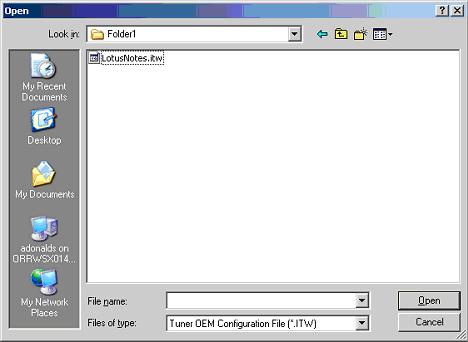
- When InstallShield launches, you will be stopped by this prompt:
You need to select the file LotusNotes.itw, and click Open.

- When the application opens, click "“Create a new transform file…"” from the middle pane.
- In the “Select MSI file” box, click Browse, and browse to C:\Folder1\ and select the file LotusNotes 7.0.1.msi. Click Open.
- In the section "“Provide a new project name and location…."”, type in C:\Folder1\R7.mst. You can give it any name or location you want. I just like to keep my stuff all in one place.
- The easiest thing to do at this point is select “Create Response File”. This will launch the Lotus Notes client installation. All you have to do is select what options you want to have available for installation. I won'’t go through this part step-by-step.
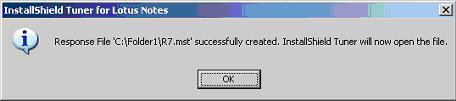
- Once you have completed this step, you should see this prompt:

Click OK.
- You will now be able to tweak your installation as you see fit. For this example, I am going to remove the icon for Notes Minder, and then add some configurations so that the following will be added to the users Notes.ini:

$STActiveToAwayEnabled=1
$STAwayToActiveEnabled=1
$STActiveToAwayTimeout=5
**If you are setting up 7.0 or less, do not include the three lines above, just the one below if you don't want the Sametime setup to launch on first run of the new client install**
IM_NO_SETUP=1

- From the left-hand column. Click on Table Editor.
- In the middle column, find the entry call Icon, and click once on it.
- In the right-hand column, locate the entry for Nminder_1.exe. Right click on it, and select “Drop Row(s) Del”. Left click on that option.

That will remove the Notes Minder icon when the application is install.

- Now under option 3, Target System Configuration, click on IniFiles.
- In the middle column, right click on Destination Computer, mouse-over Show Folder, and select ProgramFilesFolder.
- Expand the folder tree until you reach Lotus-Notes-Data. In the list under Data, click on VDIR_INI.
- Right click on VDIR_INI, and select New IniFile.
- By default, the new entry will appear as IniFile1.ini, but since its in edit mode, you need to rename it to notes.ini.
- Click on the + sign next to notes.ini, and right click to rename the NewSection to Notes.
- On the right-hand column, double-click on NewKey to remove that name, and replace it with $STActiveToAwayEnabled. In the Value field, replace “NewValue” with 1.
- Hit Insert on your keyboard to add a new “NewKey” line in the list. Repeat the steps above for your next value, and any other that you desire.
- When complete, it should resemble this:

- Now, click on the Package Wizard icon
- Change the Network Location field to C:\Folder2, and click Next.
- Check “Create Installation launcher (Setup.exe)”, and also check the two options for Windows 95/98 and NT, and click Next.
- If required, check both options for SMS, and click Next.
- Click Finish. This will copy all of the installation files and your customizations to Folder2.
- To make it so that we can push this new installation out without user intervention, I create a file called upgrade.bat. In the batch file, I have only one line that says:
msiexec /i "Lotus Notes 7.0.1.msi" TRANSFORMS="R7.mst" /qn /qb
- To install the application on a workstation, run the upgrade.bat.
- If the workstation is locked down administratively, this installation will not work. You need to have local administration rights to install Notes.

Technorati tag: